お手本に似せてランダムに絵を描く
| 難易度 | 中級 | 時間 | 60 分~ |
「コンピュータに絵を描かせる」といっても、流行りの生成 AI は使いません。使うのは、シンプルなプログラムと乱数だけです。
真っ白なキャンバスに、プログラムがランダムに線を引いたり図形を配置したりします。その中からお手本に近づいたものだけを採用していくと、最初はただの落書きだったものが、徐々に、しかし確実に「味のある幾何学的なアート」へと変化していきます。
プログラムが一生懸命に絵を真似て、カオスな画面が美しい絵画に収束していく、その少し不思議でクリエイティブな過程を一緒に楽しみましょう。
1. 画像を開いて表示する
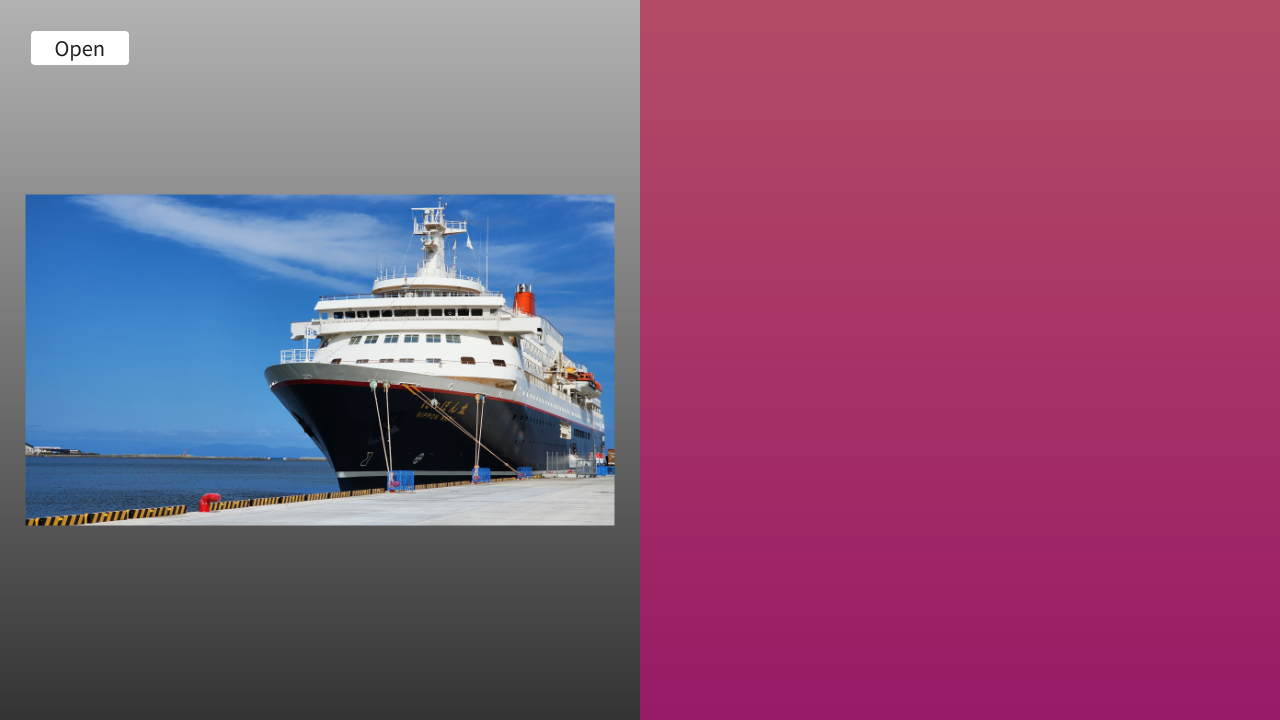
- まずはじめに、模写の対象となるお手本画像を読み込む機能を作ります
- ここでは、ボタンを押して画像ファイルを選択し、適切なサイズにリサイズしたあと、それを画面の左側に表示するところまで実装します
コード
# include <Siv3D.hpp>

void Main()
{
	// 画面サイズの設定
	Window::Resize(1280, 720);

	// キャンバスの最大サイズ(大きいと処理に時間がかかる)
	static constexpr Size MaxCanvasSize{ 640, 720 };

	// お手本画像(メインメモリ上)
	Image targetImage;
	// お手本画像を描画するためのテクスチャ(VRAM 上)
	Texture targetTexture;

	while (System::Update())
	{
		// 背景を描く
		{
			Rect{ MaxCanvasSize }.draw(Arg::top(0.7), Arg::bottom(0.2));
			Rect{ MaxCanvasSize.x, 0, MaxCanvasSize }.draw(Arg::top(0.7, 0.3, 0.4), Arg::bottom(0.6, 0.1, 0.4));
		}

		// お手本画像を画面の左側に表示
		if (targetTexture)
		{
			targetTexture.scaled(0.92).drawAt(MaxCanvasSize / 2);
		}

		// お手本画像を開くボタン
		if (SimpleGUI::Button(U"Open", Vec2{ 30, 30 }, 100))
		{
			if (Image image = Dialog::OpenImage()) // 画像を正しく開けた場合
			{
				// キャンバスの最大サイズに合わせてリサイズ
				targetImage = image.fitted(MaxCanvasSize);
				// 透過は無視して不透明にする
				for (auto& pixel : targetImage)
				{
					pixel.a = 255;
				}

				// お手本テクスチャを新規作成
				targetTexture = Texture{ targetImage };
			}
		}
	}
}
2. キャンバスを作成して表示する
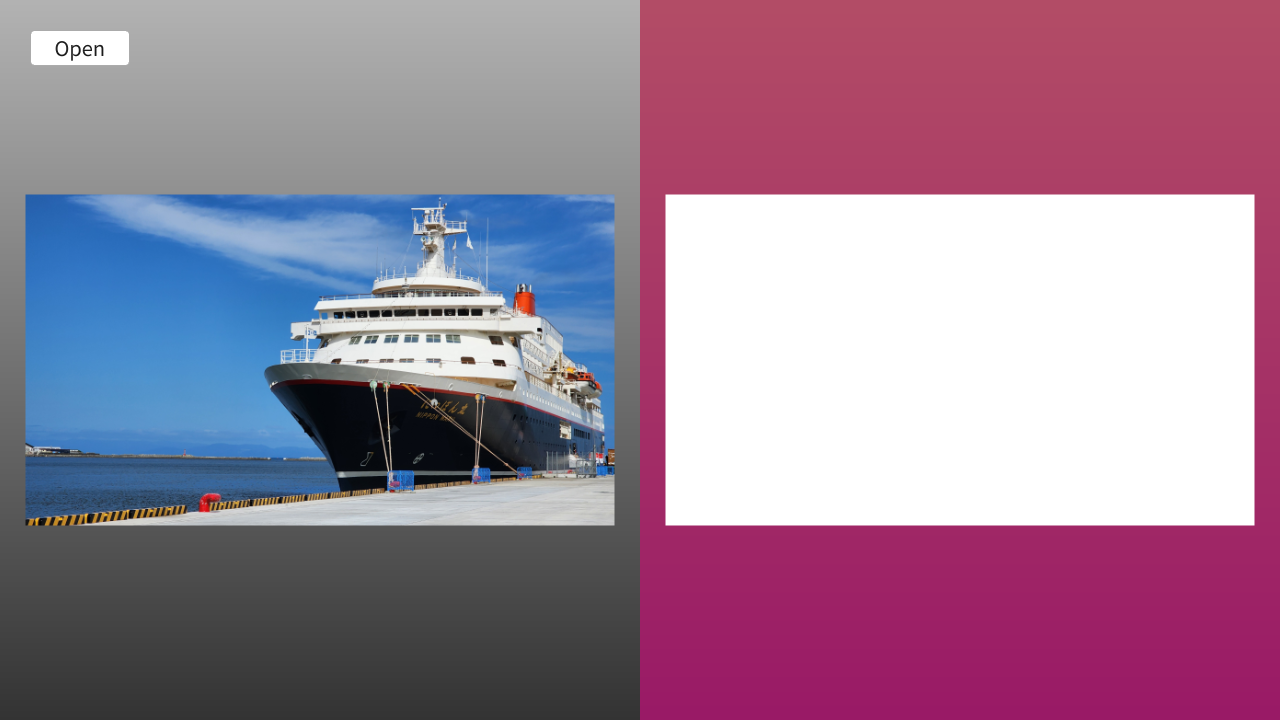
- お手本画像の隣に、絵を描くためのキャンバスを用意します。
- 左側にお手本、右側にキャンバスを並べることで、プログラムがどのように絵を再現していくかを見比べることができるようになります
- 現時点では、キャンバスは白紙です
コード
# include <Siv3D.hpp>

void Main()
{
	// 画面サイズの設定
	Window::Resize(1280, 720);

	// キャンバスの最大サイズ(大きいと処理に時間がかかる)
	static constexpr Size MaxCanvasSize{ 640, 720 };

	// お手本画像(メインメモリ上)
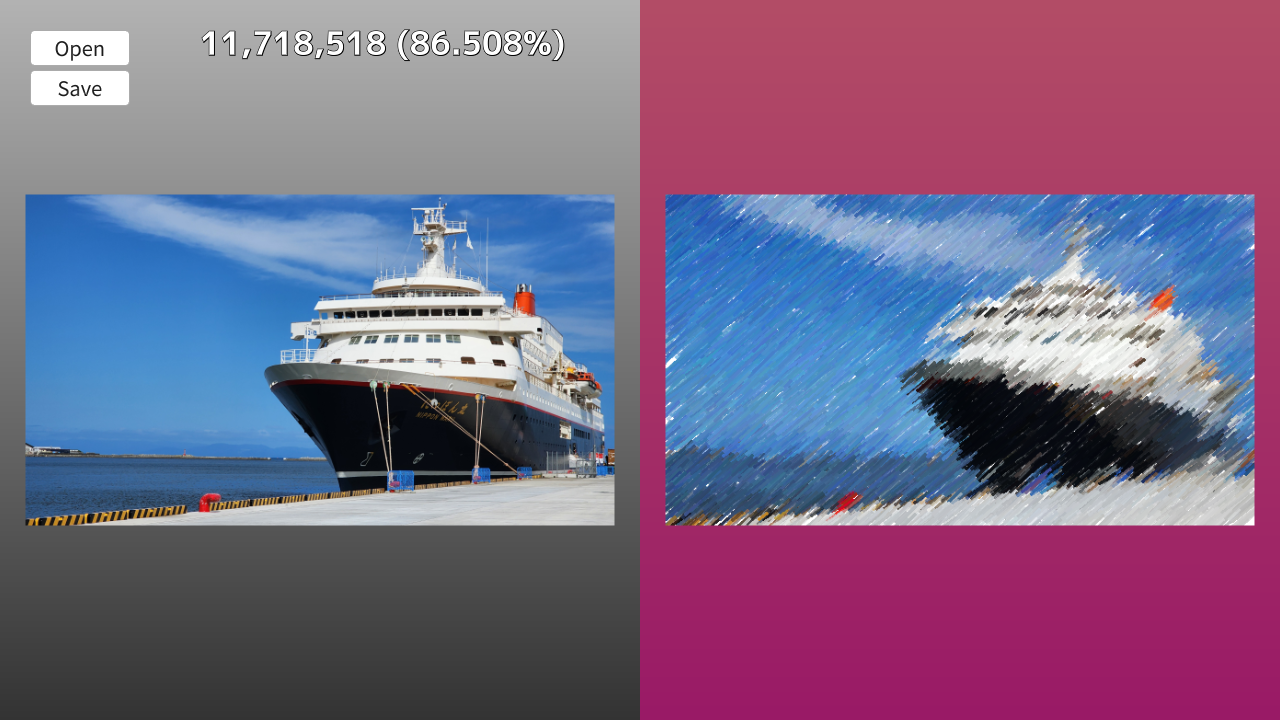
	Image targetImage;
	// お手本画像を描画するためのテクスチャ(VRAM 上)
	Texture targetTexture;

	// キャンバス画像(メインメモリ上)
	Image canvas;
	// キャンバスの内容を描画するための動的テクスチャ(VRAM 上)
	DynamicTexture canvasTexture;

	while (System::Update())
	{
		// 背景を描く
		{
			Rect{ MaxCanvasSize }.draw(Arg::top(0.7), Arg::bottom(0.2));
			Rect{ MaxCanvasSize.x, 0, MaxCanvasSize }.draw(Arg::top(0.7, 0.3, 0.4), Arg::bottom(0.6, 0.1, 0.4));
		}

		// お手本画像を画面の左側に表示
		if (targetTexture)
		{
			targetTexture.scaled(0.92).drawAt(MaxCanvasSize / 2);
		}

		// キャンバスを画面の右側に表示
		if (canvasTexture)
		{
			canvasTexture.scaled(0.92).drawAt(MaxCanvasSize * Vec2{ 1.5, 0.5 });
		}

		// お手本画像を開くボタン
		if (SimpleGUI::Button(U"Open", Vec2{ 30, 30 }, 100))
		{
			if (Image image = Dialog::OpenImage()) // 画像を正しく開けた場合
			{
				// キャンバスの最大サイズに合わせてリサイズ
				targetImage = image.fitted(MaxCanvasSize);
				// 透過は無視して不透明にする
				for (auto& pixel : targetImage)
				{
					pixel.a = 255;
				}

				// お手本テクスチャを新規作成
				targetTexture = Texture{ targetImage };

				// お手本画像と同じサイズでキャンバスを新規作成
				canvas = Image{ targetImage.size(), Color{ 255 } };

				// 新しいキャンバスサイズで動的テクスチャを作成
				canvasTexture = DynamicTexture{ canvas };
			}
		}
	}
}
3. ランダムに円を書き込む
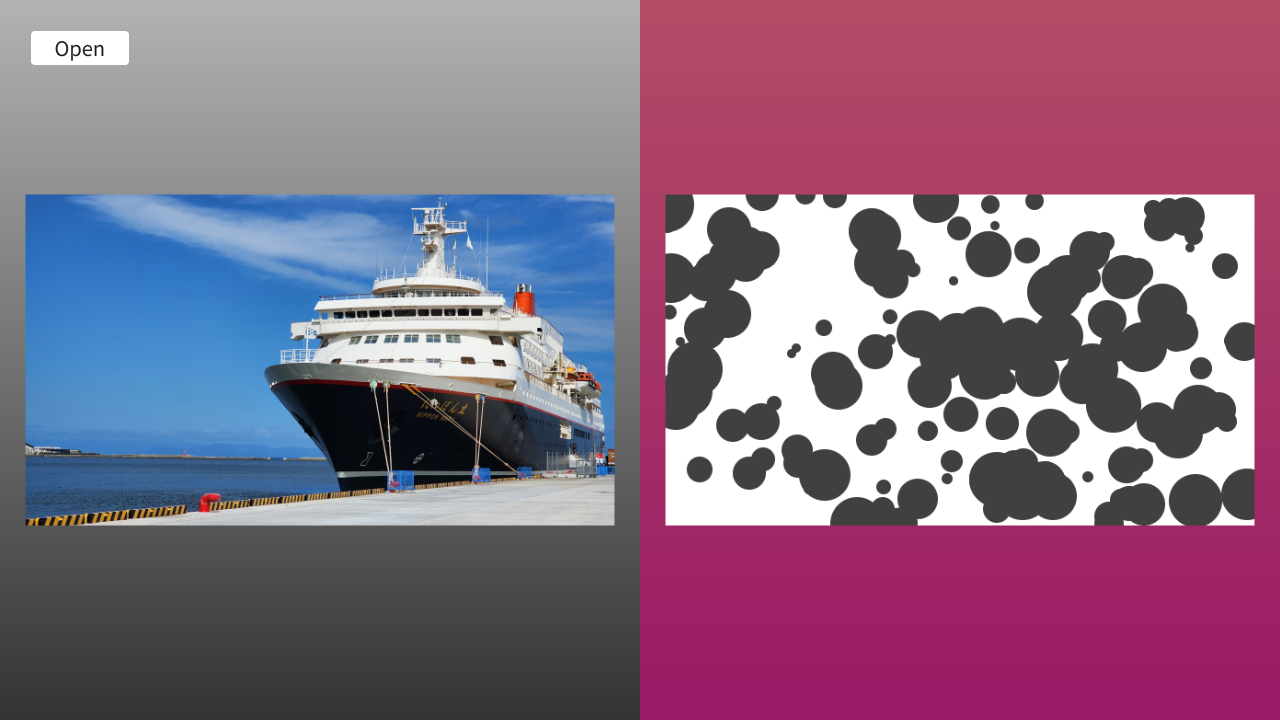
- ここからいよいよ描画処理に入ります。まずはシンプルに、キャンバス上のランダムな位置に、ランダムな大きさの「円」を描き込んでみます
- 今の段階では「お手本に似ているかどうか」の判断を行わず、無条件で円を描き続けるため、キャンバスはすぐに灰色の円で埋め尽くされます
コード
# include <Siv3D.hpp>

/// @brief ランダムな円をキャンバスに描画します。
/// @param target お手本画像
/// @param canvas キャンバス画像
/// @param currentDistance 現在の距離
void DrawRandomCircle(const Image& target, Image& canvas)
{
	// キャンバスのサイズ
	const Size canvasSize = canvas.size();
	// 円の中心座標をランダムに決定
	const Point center{ Random(canvasSize.x - 1), Random(canvasSize.y - 1) };
	// 円の半径をランダムに決定
	const int32 radius = Random(5, 30);

	// 円の色
	Color color{ 64, 64, 64 };

	// 円をキャンバスに書き込む
	Circle{ center, radius }.paint(canvas, color, Antialiased::Yes);
}

void Main()
{
	// 画面サイズの設定
	Window::Resize(1280, 720);

	// キャンバスの最大サイズ(大きいと処理に時間がかかる)
	static constexpr Size MaxCanvasSize{ 640, 720 };

	// お手本画像(メインメモリ上)
	Image targetImage;
	// お手本画像を描画するためのテクスチャ(VRAM 上)
	Texture targetTexture;

	// キャンバス画像(メインメモリ上)
	Image canvas;
	// キャンバスの内容を描画するための動的テクスチャ(VRAM 上)
	DynamicTexture canvasTexture;
	// 新しいキャンバスの状態の候補画像(メインメモリ上)
	Image candidateImage;

	while (System::Update())
	{
		// 背景を描く
		{
			Rect{ MaxCanvasSize }.draw(Arg::top(0.7), Arg::bottom(0.2));
			Rect{ MaxCanvasSize.x, 0, MaxCanvasSize }.draw(Arg::top(0.7, 0.3, 0.4), Arg::bottom(0.6, 0.1, 0.4));
		}

		// お手本画像を画面の左側に表示
		if (targetTexture)
		{
			targetTexture.scaled(0.92).drawAt(MaxCanvasSize / 2);
		}

		// キャンバスを画面の右側に表示
		if (canvasTexture)
		{
			canvasTexture.scaled(0.92).drawAt(MaxCanvasSize * Vec2{ 1.5, 0.5 });
		}

		// お手本画像を開くボタン
		if (SimpleGUI::Button(U"Open", Vec2{ 30, 30 }, 100))
		{
			if (Image image = Dialog::OpenImage()) // 画像を正しく開けた場合
			{
				// キャンバスの最大サイズに合わせてリサイズ
				targetImage = image.fitted(MaxCanvasSize);
				// 透過は無視して不透明にする
				for (auto& pixel : targetImage)
				{
					pixel.a = 255;
				}

				// お手本テクスチャを新規作成
				targetTexture = Texture{ targetImage };

				// お手本画像と同じサイズでキャンバスを新規作成
				canvas = Image{ targetImage.size(), Color{ 255 } };

				// 新しいキャンバスサイズで動的テクスチャを作成
				canvasTexture = DynamicTexture{ canvas };
			}
		}

		// 次の状態の作成
		if (targetImage && canvas)
		{
			// キャンバスの候補画像を現在のキャンバスの状態と一致させる
			candidateImage = canvas;

			// 候補画像にランダムな円を描画
			DrawRandomCircle(targetImage, candidateImage);

			// 無条件で採用する(将来的には距離が縮まった場合のみ採用するようにする)
			canvas = candidateImage;

			// 動的テクスチャを、新しいキャンバスの内容で更新
			canvasTexture.fill(canvas);
		}
	}
}
4. お手本画像との差分を計算し、近づいた場合のみ採用する
- ここがこのプログラムで最も重要な部分です
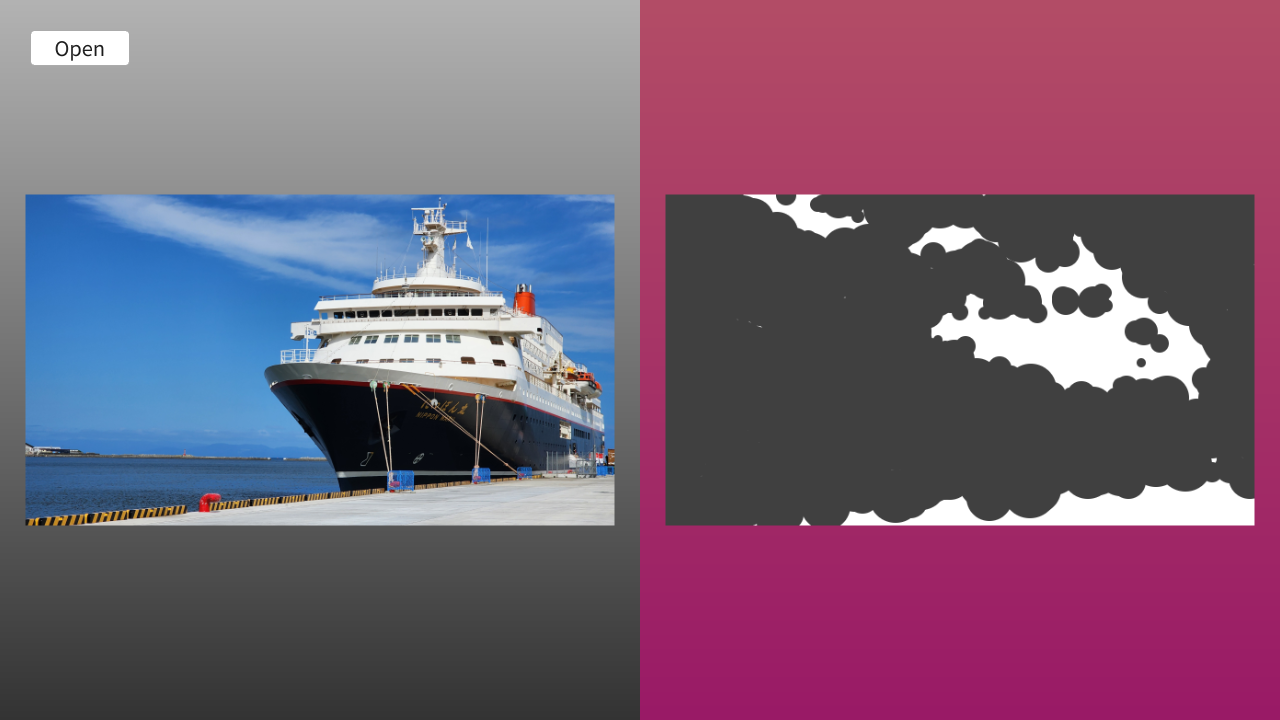
- 「今のキャンバス」と「試しに円を描いたキャンバス」のそれぞれについて、お手本画像との色の違い(距離)を計算します
- 円を描いた方が、少しでもお手本に近づいた場合だけ、その結果を採用するようにします
- これを繰り返すことで、最初はただの円の集まりだったものが、徐々に、お手本のシルエットを浮かび上がらせていきます
コード
# include <Siv3D.hpp>

// 距離の型(各ピクセルの色の差の絶対値の総和で、高々 255 * 3 * ピクセル数)
using DistanceType = int32;

/// @brief 2 つの画像の距離(各ピクセルの色の差の絶対値の総和)を返します。
/// @param a 一方の画像
/// @param b もう一方の画像
/// @return 各ピクセルの色の差の絶対値の総和。画像のサイズが異なる場合は -1 を返す
DistanceType Distance(const Image& a, const Image& b)
{
	if (a.size() != b.size())
	{
		return -1;
	}

	// オーバーヘッドを避けるためにポインタでループ
	const size_t pixelCount = a.num_pixels();
	const Color* pA = a.data();
	const Color* pAEnd = (pA + pixelCount);
	const Color* pB = b.data();

	DistanceType result = 0;
	while (pA != pAEnd)
	{
		result += Abs(static_cast<int32>(pA->r) - static_cast<int32>(pB->r));
		result += Abs(static_cast<int32>(pA->g) - static_cast<int32>(pB->g));
		result += Abs(static_cast<int32>(pA->b) - static_cast<int32>(pB->b));
		++pA;
		++pB;
	}

	/*
	// シンプルな二重ループ版(オーバーヘッドが大きい)
	for (int32 y = 0; y < a.height(); ++y)
	{
		for (int32 x = 0; x < a.width(); ++x)
		{
			const Color colorA = a[y][x];
			const Color colorB = b[y][x];
			result += Abs(static_cast<int32>(colorA.r) - static_cast<int32>(colorB.r));
			result += Abs(static_cast<int32>(colorA.g) - static_cast<int32>(colorB.g));
			result += Abs(static_cast<int32>(colorA.b) - static_cast<int32>(colorB.b));
		}
	}
	*/

	return result;
}

/// @brief ランダムな円をキャンバスに描画します。
/// @param target お手本画像
/// @param canvas キャンバス画像
/// @param currentDistance 現在の距離
/// @return 新しい距離
DistanceType DrawRandomCircle(const Image& target, Image& canvas)
{
	// キャンバスのサイズ
	const Size canvasSize = canvas.size();
	// 円の中心座標をランダムに決定
	const Point center{ Random(canvasSize.x - 1), Random(canvasSize.y - 1) };
	// 円の半径をランダムに決定
	const int32 radius = Random(5, 30);

	// 円の色
	Color color{ 64, 64, 64 };

	// 円をキャンバスに書き込む
	Circle{ center, radius }.paint(canvas, color, Antialiased::Yes);

	// 書き込み後の新しい距離を返す
	return Distance(target, canvas);
}

void Main()
{
	// 画面サイズの設定
	Window::Resize(1280, 720);

	// キャンバスの最大サイズ(大きいと処理に時間がかかる)
	static constexpr Size MaxCanvasSize{ 640, 720 };

	// お手本画像(メインメモリ上)
	Image targetImage;
	// お手本画像を描画するためのテクスチャ(VRAM 上)
	Texture targetTexture;

	// キャンバス画像(メインメモリ上)
	Image canvas;
	// キャンバスの内容を描画するための動的テクスチャ(VRAM 上)
	DynamicTexture canvasTexture;
	// 新しいキャンバスの状態の候補画像(メインメモリ上)
	Image candidateImage;

	// 2 つの画像の距離
	DistanceType initialDistance = 0; // 初期距離
	DistanceType currentDistance = 0; // 現在の距離

	while (System::Update())
	{
		// 背景を描く
		{
			Rect{ MaxCanvasSize }.draw(Arg::top(0.7), Arg::bottom(0.2));
			Rect{ MaxCanvasSize.x, 0, MaxCanvasSize }.draw(Arg::top(0.7, 0.3, 0.4), Arg::bottom(0.6, 0.1, 0.4));
		}

		// お手本画像を画面の左側に表示
		if (targetTexture)
		{
			targetTexture.scaled(0.92).drawAt(MaxCanvasSize / 2);
		}

		// キャンバスを画面の右側に表示
		if (canvasTexture)
		{
			canvasTexture.scaled(0.92).drawAt(MaxCanvasSize * Vec2{ 1.5, 0.5 });
		}

		// お手本画像を開くボタン
		if (SimpleGUI::Button(U"Open", Vec2{ 30, 30 }, 100))
		{
			if (Image image = Dialog::OpenImage()) // 画像を正しく開けた場合
			{
				// キャンバスの最大サイズに合わせてリサイズ
				targetImage = image.fitted(MaxCanvasSize);
				// 透過は無視して不透明にする
				for (auto& pixel : targetImage)
				{
					pixel.a = 255;
				}

				// お手本テクスチャを新規作成
				targetTexture = Texture{ targetImage };

				// お手本画像と同じサイズでキャンバスを新規作成
				canvas = Image{ targetImage.size(), Color{ 255 } };
				// 距離を初期化
				initialDistance = currentDistance = Distance(targetImage, canvas);

				// 新しいキャンバスサイズで動的テクスチャを作成
				canvasTexture = DynamicTexture{ canvas };
			}
		}

		// 次の状態の作成
		if (targetImage && canvas)
		{
			// この試行でキャンバスが更新されたか
			bool updated = false;

			// キャンバスの候補画像を現在のキャンバスの状態と一致させる
			candidateImage = canvas;

			// 候補画像にランダムな円を描画
			const DistanceType newDistance = DrawRandomCircle(targetImage, candidateImage);

			// 候補画像の方が距離が近ければ、採用する
			if (newDistance < currentDistance)
			{
				canvas = candidateImage;
				currentDistance = newDistance;
				updated = true;
			}

			// キャンバスが更新されていたら
			if (updated)
			{
				// 動的テクスチャを、新しいキャンバスの内容で更新
				canvasTexture.fill(canvas);
			}
		}
	}
}
5. 距離や進捗を表示する
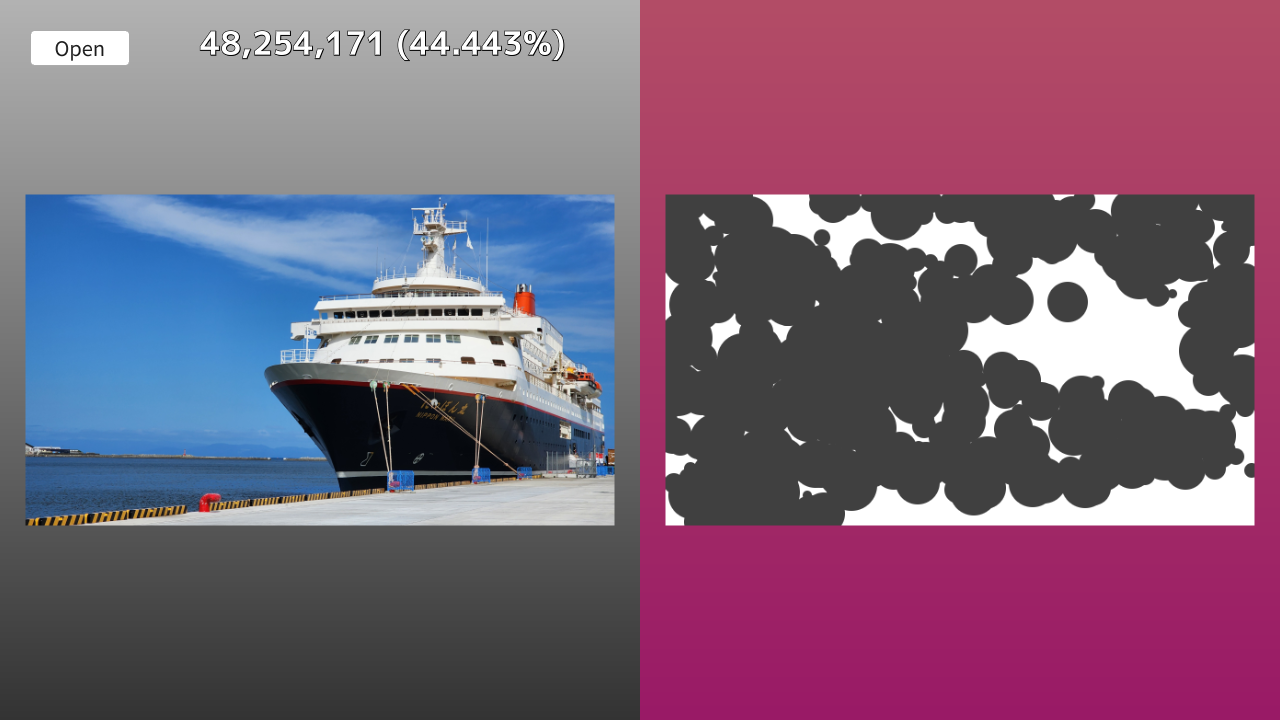
- 絵が変化していく様子は目で見ても分かりますが、数値として確認できるとより実感が湧きます
- 現在のキャンバスがお手本とどれくらい離れているかを示す「距離」と、開始時からどれくらい改善したかを示す「進捗率」を画面に表示してみましょう
- 数字が減っていく様子を眺めるだけでも、不思議な達成感を得られます
コード
# include <Siv3D.hpp>

// 距離の型(各ピクセルの色の差の絶対値の総和で、高々 255 * 3 * ピクセル数)
using DistanceType = int32;

/// @brief 2 つの画像の距離(各ピクセルの色の差の絶対値の総和)を返します。
/// @param a 一方の画像
/// @param b もう一方の画像
/// @return 各ピクセルの色の差の絶対値の総和。画像のサイズが異なる場合は -1 を返す
DistanceType Distance(const Image& a, const Image& b)
{
	if (a.size() != b.size())
	{
		return -1;
	}

	// オーバーヘッドを避けるためにポインタでループ
	const size_t pixelCount = a.num_pixels();
	const Color* pA = a.data();
	const Color* pAEnd = (pA + pixelCount);
	const Color* pB = b.data();

	DistanceType result = 0;
	while (pA != pAEnd)
	{
		result += Abs(static_cast<int32>(pA->r) - static_cast<int32>(pB->r));
		result += Abs(static_cast<int32>(pA->g) - static_cast<int32>(pB->g));
		result += Abs(static_cast<int32>(pA->b) - static_cast<int32>(pB->b));
		++pA;
		++pB;
	}

	/*
	// シンプルな二重ループ版(オーバーヘッドが大きい)
	for (int32 y = 0; y < a.height(); ++y)
	{
		for (int32 x = 0; x < a.width(); ++x)
		{
			const Color colorA = a[y][x];
			const Color colorB = b[y][x];
			result += Abs(static_cast<int32>(colorA.r) - static_cast<int32>(colorB.r));
			result += Abs(static_cast<int32>(colorA.g) - static_cast<int32>(colorB.g));
			result += Abs(static_cast<int32>(colorA.b) - static_cast<int32>(colorB.b));
		}
	}
	*/

	return result;
}

/// @brief ランダムな円をキャンバスに描画します。
/// @param target お手本画像
/// @param canvas キャンバス画像
/// @param currentDistance 現在の距離
/// @return 新しい距離
DistanceType DrawRandomCircle(const Image& target, Image& canvas)
{
	// キャンバスのサイズ
	const Size canvasSize = canvas.size();
	// 円の中心座標をランダムに決定
	const Point center{ Random(canvasSize.x - 1), Random(canvasSize.y - 1) };
	// 円の半径をランダムに決定
	const int32 radius = Random(5, 30);

	// 円の色
	Color color{ 64, 64, 64 };

	// 円をキャンバスに書き込む
	Circle{ center, radius }.paint(canvas, color, Antialiased::Yes);

	// 書き込み後の新しい距離を返す
	return Distance(target, canvas);
}

void Main()
{
	// 画面サイズの設定
	Window::Resize(1280, 720);

	// 距離表示用のフォント
	const Font font{ FontMethod::MSDF, 36, Typeface::Bold };

	// キャンバスの最大サイズ(大きいと処理に時間がかかる)
	static constexpr Size MaxCanvasSize{ 640, 720 };

	// お手本画像(メインメモリ上)
	Image targetImage;
	// お手本画像を描画するためのテクスチャ(VRAM 上)
	Texture targetTexture;

	// キャンバス画像(メインメモリ上)
	Image canvas;
	// キャンバスの内容を描画するための動的テクスチャ(VRAM 上)
	DynamicTexture canvasTexture;
	// 新しいキャンバスの状態の候補画像(メインメモリ上)
	Image candidateImage;

	// 2 つの画像の距離
	DistanceType initialDistance = 0; // 初期距離
	DistanceType currentDistance = 0; // 現在の距離

	while (System::Update())
	{
		// 背景を描く
		{
			Rect{ MaxCanvasSize }.draw(Arg::top(0.7), Arg::bottom(0.2));
			Rect{ MaxCanvasSize.x, 0, MaxCanvasSize }.draw(Arg::top(0.7, 0.3, 0.4), Arg::bottom(0.6, 0.1, 0.4));
		}

		// お手本画像を画面の左側に表示
		if (targetTexture)
		{
			targetTexture.scaled(0.92).drawAt(MaxCanvasSize / 2);
		}

		// キャンバスを画面の右側に表示
		if (canvasTexture)
		{
			canvasTexture.scaled(0.92).drawAt(MaxCanvasSize * Vec2{ 1.5, 0.5 });
		}

		// お手本画像を開くボタン
		if (SimpleGUI::Button(U"Open", Vec2{ 30, 30 }, 100))
		{
			if (Image image = Dialog::OpenImage()) // 画像を正しく開けた場合
			{
				// キャンバスの最大サイズに合わせてリサイズ
				targetImage = image.fitted(MaxCanvasSize);
				// 透過は無視して不透明にする
				for (auto& pixel : targetImage)
				{
					pixel.a = 255;
				}

				// お手本テクスチャを新規作成
				targetTexture = Texture{ targetImage };

				// お手本画像と同じサイズでキャンバスを新規作成
				canvas = Image{ targetImage.size(), Color{ 255 } };
				// 距離を初期化
				initialDistance = currentDistance = Distance(targetImage, canvas);

				// 新しいキャンバスサイズで動的テクスチャを作成
				canvasTexture = DynamicTexture{ canvas };
			}
		}

		// 次の状態の作成
		if (targetImage && canvas)
		{
			// この試行でキャンバスが更新されたか
			bool updated = false;

			// キャンバスの候補画像を現在のキャンバスの状態と一致させる
			candidateImage = canvas;

			// 候補画像にランダムな円を描画
			const DistanceType newDistance = DrawRandomCircle(targetImage, candidateImage);

			// 候補画像の方が距離が近ければ、採用する
			if (newDistance < currentDistance)
			{
				canvas = candidateImage;
				currentDistance = newDistance;
				updated = true;
			}

			// キャンバスが更新されていたら
			if (updated)
			{
				// 動的テクスチャを、新しいキャンバスの内容で更新
				canvasTexture.fill(canvas);
			}
		}

		// 距離の表示
		{
			const double progress = initialDistance ? (1.0 - (static_cast<double>(currentDistance) / initialDistance)) : 0.0; // 進捗率
			const String currentText = ThousandsSeparate(currentDistance); // 現在の距離(カンマ区切り)
			const String progressText = U" ({:.3f}%)"_fmt(progress * 100.0); // 進捗率(%)
			// 距離や進捗率を表示
			font(currentText + progressText).draw(TextStyle::OutlineShadow(0.0, 0.15, ColorF{ 0.0 }, Vec2{ 0.5, 0.5 }, ColorF{ 0.0 }), 32, Vec2{ 200, 20 }, Palette::White);
		}
	}
}
6. 色付きの円を書き込む
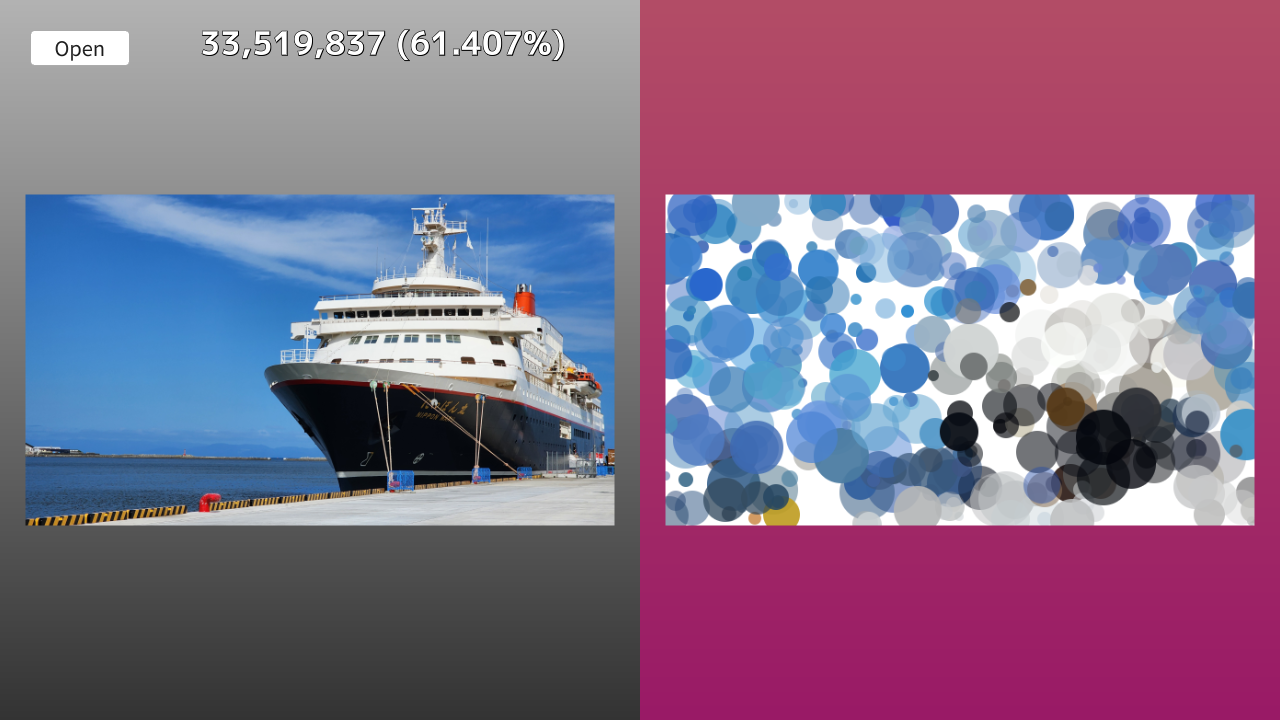
- ここまでは灰色の円でしたが、お手本画像から色を抽出してみましょう
- 円の中心座標にあるお手本の色を拾い、さらに少しだけ色味や透明度をランダムに変化させて描き込みます
コード
# include <Siv3D.hpp>

// 距離の型(各ピクセルの色の差の絶対値の総和で、高々 255 * 3 * ピクセル数)
using DistanceType = int32;

/// @brief 2 つの画像の距離(各ピクセルの色の差の絶対値の総和)を返します。
/// @param a 一方の画像
/// @param b もう一方の画像
/// @return 各ピクセルの色の差の絶対値の総和。画像のサイズが異なる場合は -1 を返す
DistanceType Distance(const Image& a, const Image& b)
{
	if (a.size() != b.size())
	{
		return -1;
	}

	// オーバーヘッドを避けるためにポインタでループ
	const size_t pixelCount = a.num_pixels();
	const Color* pA = a.data();
	const Color* pAEnd = (pA + pixelCount);
	const Color* pB = b.data();

	DistanceType result = 0;
	while (pA != pAEnd)
	{
		result += Abs(static_cast<int32>(pA->r) - static_cast<int32>(pB->r));
		result += Abs(static_cast<int32>(pA->g) - static_cast<int32>(pB->g));
		result += Abs(static_cast<int32>(pA->b) - static_cast<int32>(pB->b));
		++pA;
		++pB;
	}

	/*
	// シンプルな二重ループ版(オーバーヘッドが大きい)
	for (int32 y = 0; y < a.height(); ++y)
	{
		for (int32 x = 0; x < a.width(); ++x)
		{
			const Color colorA = a[y][x];
			const Color colorB = b[y][x];
			result += Abs(static_cast<int32>(colorA.r) - static_cast<int32>(colorB.r));
			result += Abs(static_cast<int32>(colorA.g) - static_cast<int32>(colorB.g));
			result += Abs(static_cast<int32>(colorA.b) - static_cast<int32>(colorB.b));
		}
	}
	*/

	return result;
}

/// @brief ランダムな円をキャンバスに描画します。
/// @param target お手本画像
/// @param canvas キャンバス画像
/// @param currentDistance 現在の距離
/// @return 新しい距離
DistanceType DrawRandomCircle(const Image& target, Image& canvas)
{
	// キャンバスのサイズ
	const Size canvasSize = canvas.size();
	// 円の中心座標をランダムに決定
	const Point center{ Random(canvasSize.x - 1), Random(canvasSize.y - 1) };
	// 円の半径をランダムに決定
	const int32 radius = Random(5, 30);

	// 円の色
	Color color = target[center];
	// 色を少し変化させる
	{
		HSV hsv{ color };
		hsv.h += Random(-10.0, 10.0); // 色相を ±10 度変化させる
		hsv.s = Clamp(hsv.s * Random(0.9, 1.1), 0.0, 1.0); // 彩度を 0.9 ~ 1.1 倍に変化させる
		hsv.v = Clamp(hsv.v * Random(0.9, 1.1), 0.0, 1.0); // 明度を 0.9 ~ 1.1 倍に変化させる
		hsv.a = Random(0.4, 1.0); // 透明度もランダムに変化させる
		color = ColorF{ hsv };
	}

	// 円をキャンバスに書き込む
	Circle{ center, radius }.paint(canvas, color, Antialiased::Yes);

	// 書き込み後の新しい距離を返す
	return Distance(target, canvas);
}

void Main()
{
	// 画面サイズの設定
	Window::Resize(1280, 720);

	// 距離表示用のフォント
	const Font font{ FontMethod::MSDF, 36, Typeface::Bold };

	// キャンバスの最大サイズ(大きいと処理に時間がかかる)
	static constexpr Size MaxCanvasSize{ 640, 720 };

	// お手本画像(メインメモリ上)
	Image targetImage;
	// お手本画像を描画するためのテクスチャ(VRAM 上)
	Texture targetTexture;

	// キャンバス画像(メインメモリ上)
	Image canvas;
	// キャンバスの内容を描画するための動的テクスチャ(VRAM 上)
	DynamicTexture canvasTexture;
	// 新しいキャンバスの状態の候補画像(メインメモリ上)
	Image candidateImage;

	// 2 つの画像の距離
	DistanceType initialDistance = 0; // 初期距離
	DistanceType currentDistance = 0; // 現在の距離

	while (System::Update())
	{
		// 背景を描く
		{
			Rect{ MaxCanvasSize }.draw(Arg::top(0.7), Arg::bottom(0.2));
			Rect{ MaxCanvasSize.x, 0, MaxCanvasSize }.draw(Arg::top(0.7, 0.3, 0.4), Arg::bottom(0.6, 0.1, 0.4));
		}

		// お手本画像を画面の左側に表示
		if (targetTexture)
		{
			targetTexture.scaled(0.92).drawAt(MaxCanvasSize / 2);
		}

		// キャンバスを画面の右側に表示
		if (canvasTexture)
		{
			canvasTexture.scaled(0.92).drawAt(MaxCanvasSize * Vec2{ 1.5, 0.5 });
		}

		// お手本画像を開くボタン
		if (SimpleGUI::Button(U"Open", Vec2{ 30, 30 }, 100))
		{
			if (Image image = Dialog::OpenImage()) // 画像を正しく開けた場合
			{
				// キャンバスの最大サイズに合わせてリサイズ
				targetImage = image.fitted(MaxCanvasSize);
				// 透過は無視して不透明にする
				for (auto& pixel : targetImage)
				{
					pixel.a = 255;
				}

				// お手本テクスチャを新規作成
				targetTexture = Texture{ targetImage };

				// お手本画像と同じサイズでキャンバスを新規作成
				canvas = Image{ targetImage.size(), Color{ 255 } };
				// 距離を初期化
				initialDistance = currentDistance = Distance(targetImage, canvas);

				// 新しいキャンバスサイズで動的テクスチャを作成
				canvasTexture = DynamicTexture{ canvas };
			}
		}

		// 次の状態の作成
		if (targetImage && canvas)
		{
			// この試行でキャンバスが更新されたか
			bool updated = false;

			// キャンバスの候補画像を現在のキャンバスの状態と一致させる
			candidateImage = canvas;

			// 候補画像にランダムな円を描画
			const DistanceType newDistance = DrawRandomCircle(targetImage, candidateImage);

			// 候補画像の方が距離が近ければ、採用する
			if (newDistance < currentDistance)
			{
				canvas = candidateImage;
				currentDistance = newDistance;
				updated = true;
			}

			// キャンバスが更新されていたら
			if (updated)
			{
				// 動的テクスチャを、新しいキャンバスの内容で更新
				canvasTexture.fill(canvas);
			}
		}

		// 距離の表示
		{
			const double progress = initialDistance ? (1.0 - (static_cast<double>(currentDistance) / initialDistance)) : 0.0; // 進捗率
			const String currentText = ThousandsSeparate(currentDistance); // 現在の距離(カンマ区切り)
			const String progressText = U" ({:.3f}%)"_fmt(progress * 100.0); // 進捗率(%)
			// 距離や進捗率を表示
			font(currentText + progressText).draw(TextStyle::OutlineShadow(0.0, 0.15, ColorF{ 0.0 }, Vec2{ 0.5, 0.5 }, ColorF{ 0.0 }), 32, Vec2{ 200, 20 }, Palette::White);
		}
	}
}
7. 毎フレーム複数回試行する
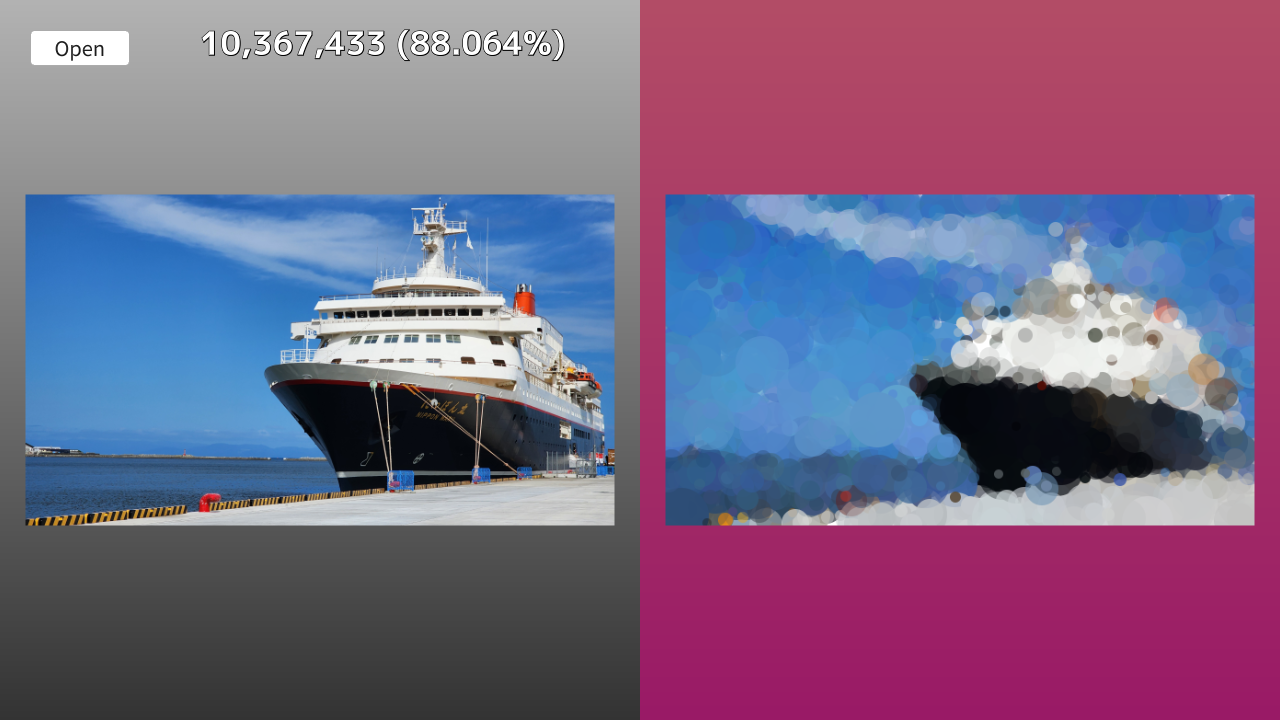
- これまでは 1 フレームにつき 1 回しか円を描く試行をしていなかったため、絵の完成には時間がかかりました
- 「円を描いて、近づいたら採用」というループを、1 フレームで複数回(ここでは 5 回)回すように変更します。これによって描画のペースが速くなります
- あまり多くしすぎると逆にフレームレートが低下するため、適切な回数を選んでください
コード
# include <Siv3D.hpp>

// 距離の型(各ピクセルの色の差の絶対値の総和で、高々 255 * 3 * ピクセル数)
using DistanceType = int32;

/// @brief 2 つの画像の距離(各ピクセルの色の差の絶対値の総和)を返します。
/// @param a 一方の画像
/// @param b もう一方の画像
/// @return 各ピクセルの色の差の絶対値の総和。画像のサイズが異なる場合は -1 を返す
DistanceType Distance(const Image& a, const Image& b)
{
	if (a.size() != b.size())
	{
		return -1;
	}

	// オーバーヘッドを避けるためにポインタでループ
	const size_t pixelCount = a.num_pixels();
	const Color* pA = a.data();
	const Color* pAEnd = (pA + pixelCount);
	const Color* pB = b.data();

	DistanceType result = 0;
	while (pA != pAEnd)
	{
		result += Abs(static_cast<int32>(pA->r) - static_cast<int32>(pB->r));
		result += Abs(static_cast<int32>(pA->g) - static_cast<int32>(pB->g));
		result += Abs(static_cast<int32>(pA->b) - static_cast<int32>(pB->b));
		++pA;
		++pB;
	}

	/*
	// シンプルな二重ループ版(オーバーヘッドが大きい)
	for (int32 y = 0; y < a.height(); ++y)
	{
		for (int32 x = 0; x < a.width(); ++x)
		{
			const Color colorA = a[y][x];
			const Color colorB = b[y][x];
			result += Abs(static_cast<int32>(colorA.r) - static_cast<int32>(colorB.r));
			result += Abs(static_cast<int32>(colorA.g) - static_cast<int32>(colorB.g));
			result += Abs(static_cast<int32>(colorA.b) - static_cast<int32>(colorB.b));
		}
	}
	*/

	return result;
}

/// @brief ランダムな円をキャンバスに描画します。
/// @param target お手本画像
/// @param canvas キャンバス画像
/// @param currentDistance 現在の距離
/// @return 新しい距離
DistanceType DrawRandomCircle(const Image& target, Image& canvas)
{
	// キャンバスのサイズ
	const Size canvasSize = canvas.size();
	// 円の中心座標をランダムに決定
	const Point center{ Random(canvasSize.x - 1), Random(canvasSize.y - 1) };
	// 円の半径をランダムに決定
	const int32 radius = Random(5, 30);

	// 円の色
	Color color = target[center];
	// 色を少し変化させる
	{
		HSV hsv{ color };
		hsv.h += Random(-10.0, 10.0); // 色相を ±10 度変化させる
		hsv.s = Clamp(hsv.s * Random(0.9, 1.1), 0.0, 1.0); // 彩度を 0.9 ~ 1.1 倍に変化させる
		hsv.v = Clamp(hsv.v * Random(0.9, 1.1), 0.0, 1.0); // 明度を 0.9 ~ 1.1 倍に変化させる
		hsv.a = Random(0.4, 1.0); // 透明度もランダムに変化させる
		color = ColorF{ hsv };
	}

	// 円をキャンバスに書き込む
	Circle{ center, radius }.paint(canvas, color, Antialiased::Yes);

	// 書き込み後の新しい距離を返す
	return Distance(target, canvas);
}

void Main()
{
	// 画面サイズの設定
	Window::Resize(1280, 720);

	// 距離表示用のフォント
	const Font font{ FontMethod::MSDF, 36, Typeface::Bold };

	// キャンバスの最大サイズ(大きいと処理に時間がかかる)
	static constexpr Size MaxCanvasSize{ 640, 720 };

	// お手本画像(メインメモリ上)
	Image targetImage;
	// お手本画像を描画するためのテクスチャ(VRAM 上)
	Texture targetTexture;

	// キャンバス画像(メインメモリ上)
	Image canvas;
	// キャンバスの内容を描画するための動的テクスチャ(VRAM 上)
	DynamicTexture canvasTexture;
	// 新しいキャンバスの状態の候補画像(メインメモリ上)
	Image candidateImage;

	// 2 つの画像の距離
	DistanceType initialDistance = 0; // 初期距離
	DistanceType currentDistance = 0; // 現在の距離

	while (System::Update())
	{
		// 背景を描く
		{
			Rect{ MaxCanvasSize }.draw(Arg::top(0.7), Arg::bottom(0.2));
			Rect{ MaxCanvasSize.x, 0, MaxCanvasSize }.draw(Arg::top(0.7, 0.3, 0.4), Arg::bottom(0.6, 0.1, 0.4));
		}

		// お手本画像を画面の左側に表示
		if (targetTexture)
		{
			targetTexture.scaled(0.92).drawAt(MaxCanvasSize / 2);
		}

		// キャンバスを画面の右側に表示
		if (canvasTexture)
		{
			canvasTexture.scaled(0.92).drawAt(MaxCanvasSize * Vec2{ 1.5, 0.5 });
		}

		// お手本画像を開くボタン
		if (SimpleGUI::Button(U"Open", Vec2{ 30, 30 }, 100))
		{
			if (Image image = Dialog::OpenImage()) // 画像を正しく開けた場合
			{
				// キャンバスの最大サイズに合わせてリサイズ
				targetImage = image.fitted(MaxCanvasSize);
				// 透過は無視して不透明にする
				for (auto& pixel : targetImage)
				{
					pixel.a = 255;
				}

				// お手本テクスチャを新規作成
				targetTexture = Texture{ targetImage };

				// お手本画像と同じサイズでキャンバスを新規作成
				canvas = Image{ targetImage.size(), Color{ 255 } };
				// 距離を初期化
				initialDistance = currentDistance = Distance(targetImage, canvas);

				// 新しいキャンバスサイズで動的テクスチャを作成
				canvasTexture = DynamicTexture{ canvas };
			}
		}

		// 次の状態の作成
		if (targetImage && canvas)
		{
			// この試行でキャンバスが更新されたか
			bool updated = false;

			// 毎フレーム 5 回試行
			for (int32 i = 0; i < 5; ++i)
			{
				// キャンバスの候補画像を現在のキャンバスの状態と一致させる
				candidateImage = canvas;

				// 候補画像にランダムな円を描画
				const DistanceType newDistance = DrawRandomCircle(targetImage, candidateImage);

				// 候補画像の方が距離が近ければ、採用する
				if (newDistance < currentDistance)
				{
					canvas = candidateImage;
					currentDistance = newDistance;
					updated = true;
				}
			}

			// キャンバスが更新されていたら
			if (updated)
			{
				// 動的テクスチャを、新しいキャンバスの内容で更新
				canvasTexture.fill(canvas);
			}
		}

		// 距離の表示
		{
			const double progress = initialDistance ? (1.0 - (static_cast<double>(currentDistance) / initialDistance)) : 0.0; // 進捗率
			const String currentText = ThousandsSeparate(currentDistance); // 現在の距離(カンマ区切り)
			const String progressText = U" ({:.3f}%)"_fmt(progress * 100.0); // 進捗率(%)
			// 距離や進捗率を表示
			font(currentText + progressText).draw(TextStyle::OutlineShadow(0.0, 0.15, ColorF{ 0.0 }, Vec2{ 0.5, 0.5 }, ColorF{ 0.0 }), 32, Vec2{ 200, 20 }, Palette::White);
		}
	}
}
8. 線を書き込む
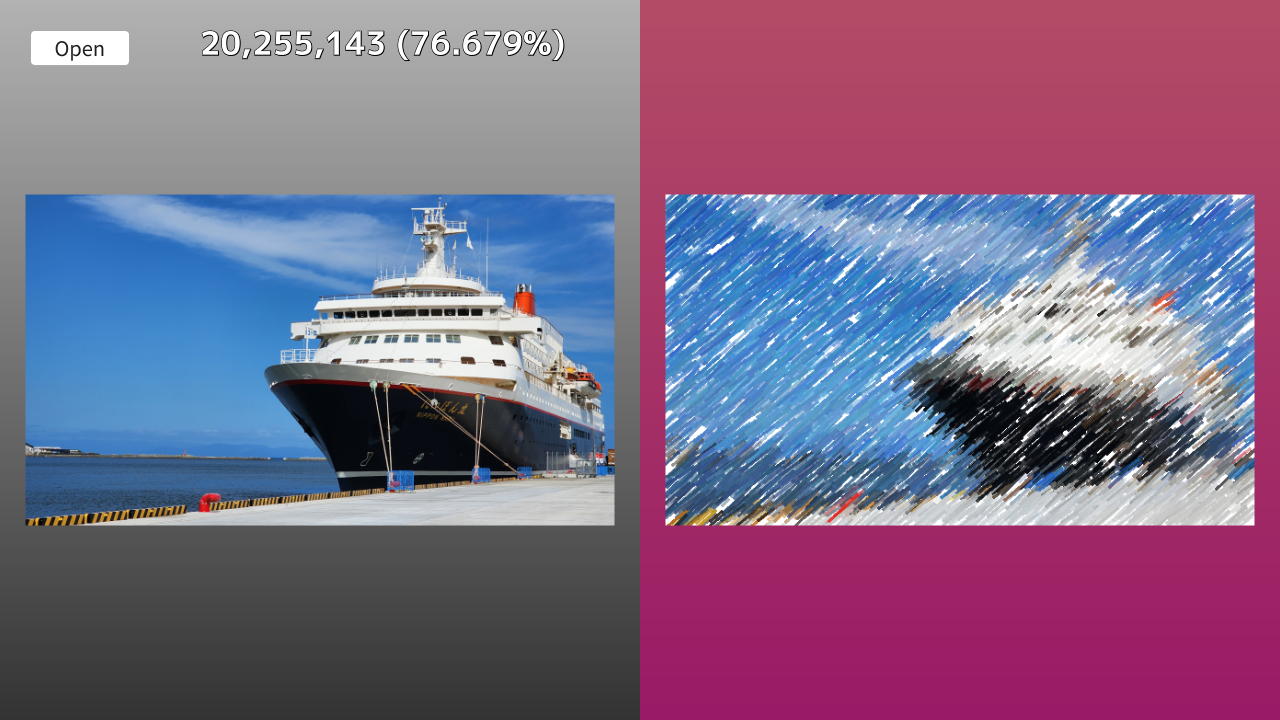
- 描く図形を「円」から「線分」に変えてみましょう。
- ランダムな角度や長さの線で構成することで、色鉛筆で描いたようなタッチに変化します
- 描く図形の種類やパラメータを変えるだけで、生成されるアートの質感が大きく変わるのがこのプログラムの面白いところです
コード
# include <Siv3D.hpp>

// 距離の型(各ピクセルの色の差の絶対値の総和で、高々 255 * 3 * ピクセル数)
using DistanceType = int32;

/// @brief 2 つの画像の距離(各ピクセルの色の差の絶対値の総和)を返します。
/// @param a 一方の画像
/// @param b もう一方の画像
/// @return 各ピクセルの色の差の絶対値の総和。画像のサイズが異なる場合は -1 を返す
DistanceType Distance(const Image& a, const Image& b)
{
	if (a.size() != b.size())
	{
		return -1;
	}

	// オーバーヘッドを避けるためにポインタでループ
	const size_t pixelCount = a.num_pixels();
	const Color* pA = a.data();
	const Color* pAEnd = (pA + pixelCount);
	const Color* pB = b.data();

	DistanceType result = 0;
	while (pA != pAEnd)
	{
		result += Abs(static_cast<int32>(pA->r) - static_cast<int32>(pB->r));
		result += Abs(static_cast<int32>(pA->g) - static_cast<int32>(pB->g));
		result += Abs(static_cast<int32>(pA->b) - static_cast<int32>(pB->b));
		++pA;
		++pB;
	}

	/*
	// シンプルな二重ループ版(オーバーヘッドが大きい)
	for (int32 y = 0; y < a.height(); ++y)
	{
		for (int32 x = 0; x < a.width(); ++x)
		{
			const Color colorA = a[y][x];
			const Color colorB = b[y][x];
			result += Abs(static_cast<int32>(colorA.r) - static_cast<int32>(colorB.r));
			result += Abs(static_cast<int32>(colorA.g) - static_cast<int32>(colorB.g));
			result += Abs(static_cast<int32>(colorA.b) - static_cast<int32>(colorB.b));
		}
	}
	*/

	return result;
}

/// @brief ランダムな円をキャンバスに描画します。
/// @param target お手本画像
/// @param canvas キャンバス画像
/// @param currentDistance 現在の距離
/// @return 新しい距離
DistanceType DrawRandomCircle(const Image& target, Image& canvas)
{
	// キャンバスのサイズ
	const Size canvasSize = canvas.size();
	// 円の中心座標をランダムに決定
	const Point center{ Random(canvasSize.x - 1), Random(canvasSize.y - 1) };
	// 円の半径をランダムに決定
	const int32 radius = Random(5, 30);

	// 円の色
	Color color = target[center];
	// 色を少し変化させる
	{
		HSV hsv{ color };
		hsv.h += Random(-10.0, 10.0); // 色相を ±10 度変化させる
		hsv.s = Clamp(hsv.s * Random(0.9, 1.1), 0.0, 1.0); // 彩度を 0.9 ~ 1.1 倍に変化させる
		hsv.v = Clamp(hsv.v * Random(0.9, 1.1), 0.0, 1.0); // 明度を 0.9 ~ 1.1 倍に変化させる
		hsv.a = Random(0.4, 1.0); // 透明度もランダムに変化させる
		color = ColorF{ hsv };
	}

	// 円をキャンバスに書き込む
	Circle{ center, radius }.paint(canvas, color, Antialiased::Yes);

	// 書き込み後の新しい距離を返す
	return Distance(target, canvas);
}

/// @brief ランダムな線分をキャンバスに描画します。
/// @param target お手本画像
/// @param canvas キャンバス画像
/// @param currentDistance 現在の距離
/// @return 新しい距離
DistanceType DrawRandomStroke(const Image& target, Image& canvas)
{
	// キャンバスのサイズ
	const Size canvasSize = canvas.size();
	// 線分の中心座標をランダムに決定
	const Point center{ Random(canvasSize.x - 1), Random(canvasSize.y - 1) };
	// 線分の長さをランダムに決定
	const int32 length = Random(10, 50);
	// 線分の方向(12 時方向が 0 度、時計回りに増加)をランダムに決定
	const double angle = Random(225_deg, 235_deg);
	// 線分の太さ
	const int32 thickness = 2;

	// 円の色をお手本画像から取得
	Color color = target[center];
	// 色を少し変化させる
	{
		HSV hsv{ color };
		hsv.h += Random(-10.0, 10.0); // 色相を ±10 度変化させる
		hsv.s = Clamp(hsv.s * Random(0.9, 1.1), 0.0, 1.0); // 彩度を 0.9 ~ 1.1 倍に変化させる
		hsv.v = Clamp(hsv.v * Random(0.9, 1.1), 0.0, 1.0); // 明度を 0.9 ~ 1.1 倍に変化させる
		hsv.a = Random(0.4, 1.0); // 透明度もランダムに変化させる
		color = ColorF{ hsv };
	}

	// 線分をキャンバスに書き込む
	const Vec2 p0 = center + Circular{ (length / 2.0), (angle - 180_deg) }.toVec2(); // 線分の始点
	const Vec2 p1 = center + Circular{ (length / 2.0), angle }.toVec2(); // 線分の終点
	Line{ p0, p1 }.paint(canvas, thickness, color);

	// 書き込み後の新しい距離を返す
	return Distance(target, canvas);
}

void Main()
{
	// 画面サイズの設定
	Window::Resize(1280, 720);

	// 距離表示用のフォント
	const Font font{ FontMethod::MSDF, 36, Typeface::Bold };

	// キャンバスの最大サイズ(大きいと処理に時間がかかる)
	static constexpr Size MaxCanvasSize{ 640, 720 };

	// お手本画像(メインメモリ上)
	Image targetImage;
	// お手本画像を描画するためのテクスチャ(VRAM 上)
	Texture targetTexture;

	// キャンバス画像(メインメモリ上)
	Image canvas;
	// キャンバスの内容を描画するための動的テクスチャ(VRAM 上)
	DynamicTexture canvasTexture;
	// 新しいキャンバスの状態の候補画像(メインメモリ上)
	Image candidateImage;

	// 2 つの画像の距離
	DistanceType initialDistance = 0; // 初期距離
	DistanceType currentDistance = 0; // 現在の距離

	while (System::Update())
	{
		// 背景を描く
		{
			Rect{ MaxCanvasSize }.draw(Arg::top(0.7), Arg::bottom(0.2));
			Rect{ MaxCanvasSize.x, 0, MaxCanvasSize }.draw(Arg::top(0.7, 0.3, 0.4), Arg::bottom(0.6, 0.1, 0.4));
		}

		// お手本画像を画面の左側に表示
		if (targetTexture)
		{
			targetTexture.scaled(0.92).drawAt(MaxCanvasSize / 2);
		}

		// キャンバスを画面の右側に表示
		if (canvasTexture)
		{
			canvasTexture.scaled(0.92).drawAt(MaxCanvasSize * Vec2{ 1.5, 0.5 });
		}

		// お手本画像を開くボタン
		if (SimpleGUI::Button(U"Open", Vec2{ 30, 30 }, 100))
		{
			if (Image image = Dialog::OpenImage()) // 画像を正しく開けた場合
			{
				// キャンバスの最大サイズに合わせてリサイズ
				targetImage = image.fitted(MaxCanvasSize);
				// 透過は無視して不透明にする
				for (auto& pixel : targetImage)
				{
					pixel.a = 255;
				}

				// お手本テクスチャを新規作成
				targetTexture = Texture{ targetImage };

				// お手本画像と同じサイズでキャンバスを新規作成
				canvas = Image{ targetImage.size(), Color{ 255 } };
				// 距離を初期化
				initialDistance = currentDistance = Distance(targetImage, canvas);

				// 新しいキャンバスサイズで動的テクスチャを作成
				canvasTexture = DynamicTexture{ canvas };
			}
		}

		// 次の状態の作成
		if (targetImage && canvas)
		{
			// この試行でキャンバスが更新されたか
			bool updated = false;

			// 毎フレーム 5 回試行
			for (int32 i = 0; i < 5; ++i)
			{
				// キャンバスの候補画像を現在のキャンバスの状態と一致させる
				candidateImage = canvas;

				// 候補画像にランダムな線分を描画
				const DistanceType newDistance = DrawRandomStroke(targetImage, candidateImage);

				// 候補画像の方が距離が近ければ、採用する
				if (newDistance < currentDistance)
				{
					canvas = candidateImage;
					currentDistance = newDistance;
					updated = true;
				}
			}

			// キャンバスが更新されていたら
			if (updated)
			{
				// 動的テクスチャを、新しいキャンバスの内容で更新
				canvasTexture.fill(canvas);
			}
		}

		// 距離の表示
		{
			const double progress = initialDistance ? (1.0 - (static_cast<double>(currentDistance) / initialDistance)) : 0.0; // 進捗率
			const String currentText = ThousandsSeparate(currentDistance); // 現在の距離(カンマ区切り)
			const String progressText = U" ({:.3f}%)"_fmt(progress * 100.0); // 進捗率(%)
			// 距離や進捗率を表示
			font(currentText + progressText).draw(TextStyle::OutlineShadow(0.0, 0.15, ColorF{ 0.0 }, Vec2{ 0.5, 0.5 }, ColorF{ 0.0 }), 32, Vec2{ 200, 20 }, Palette::White);
		}
	}
}
9. キャンバス画像を保存する
- 「Save」ボタンを追加し、現在のキャンバスの状態を PNG ファイルなどで書き出せるようにします
コード
# include <Siv3D.hpp>

// 距離の型(各ピクセルの色の差の絶対値の総和で、高々 255 * 3 * ピクセル数)
using DistanceType = int32;

/// @brief 2 つの画像の距離(各ピクセルの色の差の絶対値の総和)を返します。
/// @param a 一方の画像
/// @param b もう一方の画像
/// @return 各ピクセルの色の差の絶対値の総和。画像のサイズが異なる場合は -1 を返す
DistanceType Distance(const Image& a, const Image& b)
{
	if (a.size() != b.size())
	{
		return -1;
	}

	// オーバーヘッドを避けるためにポインタでループ
	const size_t pixelCount = a.num_pixels();
	const Color* pA = a.data();
	const Color* pAEnd = (pA + pixelCount);
	const Color* pB = b.data();

	DistanceType result = 0;
	while (pA != pAEnd)
	{
		result += Abs(static_cast<int32>(pA->r) - static_cast<int32>(pB->r));
		result += Abs(static_cast<int32>(pA->g) - static_cast<int32>(pB->g));
		result += Abs(static_cast<int32>(pA->b) - static_cast<int32>(pB->b));
		++pA;
		++pB;
	}

	/*
	// シンプルな二重ループ版(オーバーヘッドが大きい)
	for (int32 y = 0; y < a.height(); ++y)
	{
		for (int32 x = 0; x < a.width(); ++x)
		{
			const Color colorA = a[y][x];
			const Color colorB = b[y][x];
			result += Abs(static_cast<int32>(colorA.r) - static_cast<int32>(colorB.r));
			result += Abs(static_cast<int32>(colorA.g) - static_cast<int32>(colorB.g));
			result += Abs(static_cast<int32>(colorA.b) - static_cast<int32>(colorB.b));
		}
	}
	*/

	return result;
}

/// @brief ランダムな円をキャンバスに描画します。
/// @param target お手本画像
/// @param canvas キャンバス画像
/// @param currentDistance 現在の距離
/// @return 新しい距離
DistanceType DrawRandomCircle(const Image& target, Image& canvas)
{
	// キャンバスのサイズ
	const Size canvasSize = canvas.size();
	// 円の中心座標をランダムに決定
	const Point center{ Random(canvasSize.x - 1), Random(canvasSize.y - 1) };
	// 円の半径をランダムに決定
	const int32 radius = Random(5, 30);

	// 円の色
	Color color = target[center];
	// 色を少し変化させる
	{
		HSV hsv{ color };
		hsv.h += Random(-10.0, 10.0); // 色相を ±10 度変化させる
		hsv.s = Clamp(hsv.s * Random(0.9, 1.1), 0.0, 1.0); // 彩度を 0.9 ~ 1.1 倍に変化させる
		hsv.v = Clamp(hsv.v * Random(0.9, 1.1), 0.0, 1.0); // 明度を 0.9 ~ 1.1 倍に変化させる
		hsv.a = Random(0.4, 1.0); // 透明度もランダムに変化させる
		color = ColorF{ hsv };
	}

	// 円をキャンバスに書き込む
	Circle{ center, radius }.paint(canvas, color, Antialiased::Yes);

	// 書き込み後の新しい距離を返す
	return Distance(target, canvas);
}

/// @brief ランダムな線分をキャンバスに描画します。
/// @param target お手本画像
/// @param canvas キャンバス画像
/// @param currentDistance 現在の距離
/// @return 新しい距離
DistanceType DrawRandomStroke(const Image& target, Image& canvas)
{
	// キャンバスのサイズ
	const Size canvasSize = canvas.size();
	// 線分の中心座標をランダムに決定
	const Point center{ Random(canvasSize.x - 1), Random(canvasSize.y - 1) };
	// 線分の長さをランダムに決定
	const int32 length = Random(10, 50);
	// 線分の方向(12 時方向が 0 度、時計回りに増加)をランダムに決定
	const double angle = Random(225_deg, 235_deg);
	// 線分の太さ
	const int32 thickness = 2;

	// 円の色をお手本画像から取得
	Color color = target[center];
	// 色を少し変化させる
	{
		HSV hsv{ color };
		hsv.h += Random(-10.0, 10.0); // 色相を ±10 度変化させる
		hsv.s = Clamp(hsv.s * Random(0.9, 1.1), 0.0, 1.0); // 彩度を 0.9 ~ 1.1 倍に変化させる
		hsv.v = Clamp(hsv.v * Random(0.9, 1.1), 0.0, 1.0); // 明度を 0.9 ~ 1.1 倍に変化させる
		hsv.a = Random(0.4, 1.0); // 透明度もランダムに変化させる
		color = ColorF{ hsv };
	}

	// 線分をキャンバスに書き込む
	const Vec2 p0 = center + Circular{ (length / 2.0), (angle - 180_deg) }.toVec2(); // 線分の始点
	const Vec2 p1 = center + Circular{ (length / 2.0), angle }.toVec2(); // 線分の終点
	Line{ p0, p1 }.paint(canvas, thickness, color);

	// 書き込み後の新しい距離を返す
	return Distance(target, canvas);
}

void Main()
{
	// 画面サイズの設定
	Window::Resize(1280, 720);

	// 距離表示用のフォント
	const Font font{ FontMethod::MSDF, 36, Typeface::Bold };

	// キャンバスの最大サイズ(大きいと処理に時間がかかる)
	static constexpr Size MaxCanvasSize{ 640, 720 };

	// お手本画像(メインメモリ上)
	Image targetImage;
	// お手本画像を描画するためのテクスチャ(VRAM 上)
	Texture targetTexture;

	// キャンバス画像(メインメモリ上)
	Image canvas;
	// キャンバスの内容を描画するための動的テクスチャ(VRAM 上)
	DynamicTexture canvasTexture;
	// 新しいキャンバスの状態の候補画像(メインメモリ上)
	Image candidateImage;

	// 2 つの画像の距離
	DistanceType initialDistance = 0; // 初期距離
	DistanceType currentDistance = 0; // 現在の距離

	while (System::Update())
	{
		// 背景を描く
		{
			Rect{ MaxCanvasSize }.draw(Arg::top(0.7), Arg::bottom(0.2));
			Rect{ MaxCanvasSize.x, 0, MaxCanvasSize }.draw(Arg::top(0.7, 0.3, 0.4), Arg::bottom(0.6, 0.1, 0.4));
		}

		// お手本画像を画面の左側に表示
		if (targetTexture)
		{
			targetTexture.scaled(0.92).drawAt(MaxCanvasSize / 2);
		}

		// キャンバスを画面の右側に表示
		if (canvasTexture)
		{
			canvasTexture.scaled(0.92).drawAt(MaxCanvasSize * Vec2{ 1.5, 0.5 });
		}

		// お手本画像を開くボタン
		if (SimpleGUI::Button(U"Open", Vec2{ 30, 30 }, 100))
		{
			if (Image image = Dialog::OpenImage()) // 画像を正しく開けた場合
			{
				// キャンバスの最大サイズに合わせてリサイズ
				targetImage = image.fitted(MaxCanvasSize);
				// 透過は無視して不透明にする
				for (auto& pixel : targetImage)
				{
					pixel.a = 255;
				}

				// お手本テクスチャを新規作成
				targetTexture = Texture{ targetImage };

				// お手本画像と同じサイズでキャンバスを新規作成
				canvas = Image{ targetImage.size(), Color{ 255 } };
				// 距離を初期化
				initialDistance = currentDistance = Distance(targetImage, canvas);

				// 新しいキャンバスサイズで動的テクスチャを作成
				canvasTexture = DynamicTexture{ canvas };
			}
		}

		// キャンバスを保存するボタン
		if (canvas && SimpleGUI::Button(U"Save", Vec2{ 30, 70 }, 100))
		{
			// 画像をファイルダイアログを使って保存
			canvas.saveWithDialog();
		}

		// 次の状態の作成
		if (targetImage && canvas)
		{
			// この試行でキャンバスが更新されたか
			bool updated = false;

			// 毎フレーム 5 回試行
			for (int32 i = 0; i < 5; ++i)
			{
				// キャンバスの候補画像を現在のキャンバスの状態と一致させる
				candidateImage = canvas;

				// 候補画像にランダムな線分を描画
				const DistanceType newDistance = DrawRandomStroke(targetImage, candidateImage);

				// 候補画像の方が距離が近ければ、採用する
				if (newDistance < currentDistance)
				{
					canvas = candidateImage;
					currentDistance = newDistance;
					updated = true;
				}
			}

			// キャンバスが更新されていたら
			if (updated)
			{
				// 動的テクスチャを、新しいキャンバスの内容で更新
				canvasTexture.fill(canvas);
			}
		}

		// 距離の表示
		{
			const double progress = initialDistance ? (1.0 - (static_cast<double>(currentDistance) / initialDistance)) : 0.0; // 進捗率
			const String currentText = ThousandsSeparate(currentDistance); // 現在の距離(カンマ区切り)
			const String progressText = U" ({:.3f}%)"_fmt(progress * 100.0); // 進捗率(%)
			// 距離や進捗率を表示
			font(currentText + progressText).draw(TextStyle::OutlineShadow(0.0, 0.15, ColorF{ 0.0 }, Vec2{ 0.5, 0.5 }, ColorF{ 0.0 }), 32, Vec2{ 200, 20 }, Palette::White);
		}
	}
}
10. 高速化のヒント
- Windows の場合、Visual Studio の Release ビルドで実行すると数倍高速化します
- 現在のコードでは、小さな円を一つ描くたびに「画像全体の全ピクセル」を走査して距離を計算し直しています
- これを、「描画によって変化した矩形範囲(バウンディングボックス)のみ」を比較するように変更することで、計算量を大幅に減らせます
- 実装のヒント:
DrawRandomCircleやDrawRandomStroke関数にcurrentDistanceを引数として渡せるようにします。関数内では画像全体を見るのではなく、書き込んだ図形の範囲内だけで距離の増減(差分)を計算し、それをcurrentDistanceに反映させた値を返すように改良します
11. 参考になるチュートリアル
- チュートリアル 8. 背景の色を変える
- HSV 表色系についての説明があります
- チュートリアル 26. 図形を描く
- 各種図形クラスに
.paint()メンバ関数が用意されていて、画像に直接描き込むことができます
- 各種図形クラスに
- チュートリアル 38. GUI
- ラジオボタン、スライダー、カラーピッカーなど、様々な GUI コンポーネントの使い方が解説されています
- チュートリアル 39. ランダム
- チュートリアル 63. 画像処理